Hardware Overview
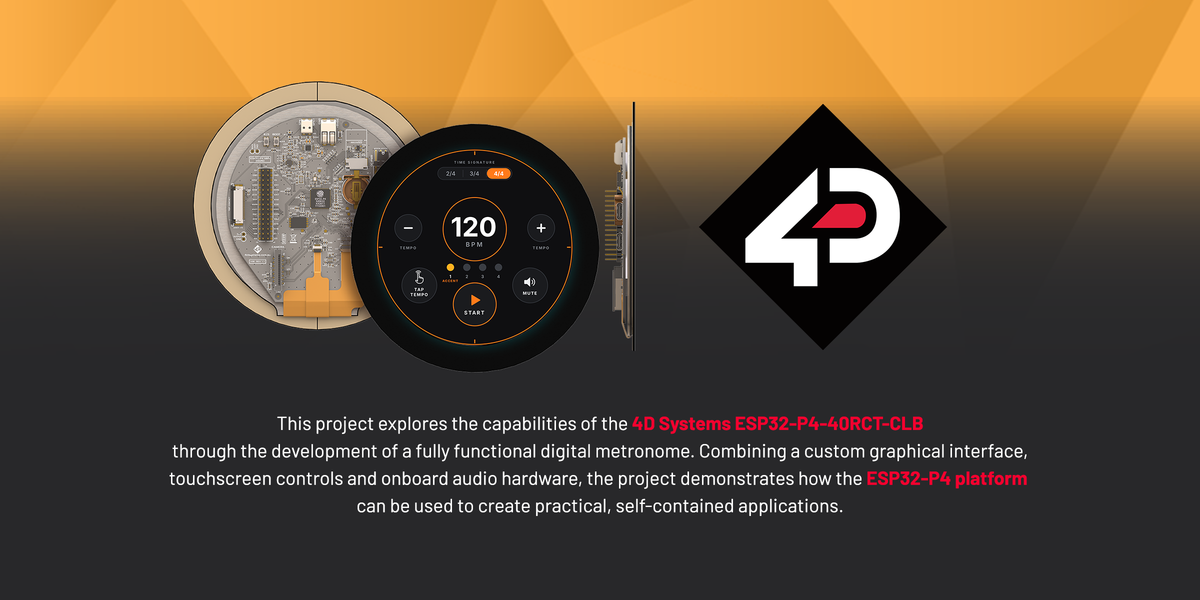
At the centre of the project is the ESP32-P4-40RCT-CLB, a 4-inch round capacitive touch display featuring a 720 × 720 pixel resolution.
The display's circular format makes it particularly well-suited to applications such as instruments, gauges and interactive control interfaces.
Audio is handled through the display's onboard ES8311 audio codec and amplifier, eliminating the need for an external amplifier board. A small 8-ohm speaker connects directly to the display's speaker outputs, keeping the hardware setup simple and compact.
Unlike internet-connected applications, this project operates entirely on the ESP32-P4, without requiring Wi-Fi connectivity or external audio files.
Custom Touchscreen Interface
The metronome interface was designed using Adobe Illustrator and implemented in Workshop4, providing an intuitive way to control timing and playback directly from the touchscreen.

The interface features a central BPM readout, surrounded by interactive controls and animated beat indicators. Graphical assets were imported into Workshop4, where UserButton and UserImages widgets manage the various interactive states.
Key features include:
- Tempo Adjustment: Increase or decrease the BPM in increments of five.
- Time Signature Selection: Switch between 2/4, 3/4 and 4/4 timing.
- Start and Stop Controls: Start or pause the metronome directly from the touchscreen.
- Tap Tempo: Calculate the BPM by tapping a rhythm on the display.
- Mute Control: Disable audio while keeping the visual beat indicators active.
- Animated Beat Indicators: Display the current beat in sync with the metronome's timing.
Audio Generation and Timing
One of the key features of this project is its ability to generate audio directly through code, without relying on prerecorded sound files.
The ESP32-P4 produces short sine waves with rapidly decreasing amplitude to create distinct metronome clicks. Different frequencies are used to distinguish the first beat of each measure from the remaining beats, making it easier to follow the selected rhythm.
Timing is managed using the micros() function, allowing the program to calculate intervals between beats without introducing blocking delays.
This approach keeps the touchscreen controls responsive while maintaining consistent timing and synchronisation between the audio output and animated beat indicators.
Get Started with the Project
This project brings together the ESP32-P4's touchscreen capabilities, custom graphical assets and onboard audio hardware to create a compact, fully functional digital metronome.
Whether you're exploring audio generation, touchscreen interfaces or timing-based applications, it's a great starting point for experimenting with the ESP32-P4 platform.
The complete project files, including the source code and graphical assets, are available through the 4D Systems Resource Centre, making it easy to download, modify and build upon the example.
For more information on the ESP32-P4 display range and other development solutions, visit the 4D Systems website.